얼리 액세스 혜택:얼리 액세스: 30% 할인, 구독을 유지하는 동안 계속.

혜택 받기

템플릿 문서는 영어로 작성되어 있습니다.

Milling Machine

SOP · SOP-60129

Milling Machine SOP 템플릿 미리보기
  • 43회 구매됨
  • 버전 4
  • Power Tools & Equipment
  • 어떤 휴대폰에서든 읽기 가능

The Milling Machine safe operating procedure provides a guide to promote safe and efficient machine operation.

It covers the hazards of milling, the pre-operational inspection, precautions including operator training, step-by-step operation, and maintenance with LOTO procedures and service logging.

A hazard checklist for powered non-mobile plant helps identify and address the hazards of milling machine use.

Milling Machine SOP 미리 보기

Milling Machine

SOPVersion 4

Acronyms

  • LOTO - Lockout/Tagout.

  • PPE - Personal Protective Equipment.

  • SOP - Safe Operating Procedure.

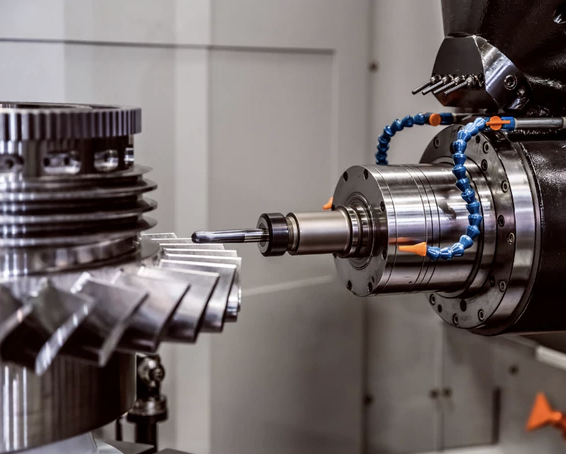
Close-up of a milling machine cutter cutting a metal gear wheel, with coolant lines running to the cutter head.

섹션 7개 더

  1. Hazards
  2. Personal protective equipment
  3. Pre-operational inspection
  4. Precautions
  5. Operation
  6. 외 2개

전체 내용이 작성되어 있어 사업장 정보만 넣으면 됩니다.

미리 보기 방식

브라우저에서 보이는 모습

이 템플릿 받기

무료로 가입한 뒤 받는 방법을 선택하세요. 회사 정보는 자동으로 채워집니다.

  • 유료 요금제에 포함

    요금제의 템플릿 크레딧을 사용하세요. 이 템플릿은 1입니다.

    요금제와 가격 비교
  • 한 번 구매하기

    $89.95 한 번 결제로 계속 소유합니다. 무료 요금제에서도 사용할 수 있습니다.

가입에 카드가 필요 없습니다. 얼리 액세스 회원은 모든 요금제에서 30% 할인을 받습니다.

다루는 내용

섹션 8개

  1. Hazards
  2. Personal protective equipment
  3. Pre-operational inspection
  4. Precautions
  5. Operation
  6. Maintenance
  7. Hazard checklist (powered non-mobile plant)

추가 구성: 용어 정의

리뷰

  • Well written with all required content.

    Darren Davey구매 인증

  • Safety After a recent injury involving a milling machine we wanted to make sure all relevant staff including long term tradesman were up to date with machine operation and safety, this SOP was absolutely spot on and easy to work through with the staff. I highly recommend it.

    Paul Nicholson구매 인증

모두 보기

템플릿 이용 방법

먼저 써 보고 결제하세요.

  1. 무료 미리 보기

    모든 템플릿의 작업 단계, 위험 요소, 첫 번째 작업 내용을 자유롭게 볼 수 있습니다. 가입이 필요 없습니다.

  2. 에디터 써 보기

    컴퓨터나 휴대폰에서 데모 SWMS에 회사, 작업, 현장 정보를 넣어 보세요.

  3. 무료 가입

    입력한 정보와 로고가 그대로 옮겨집니다. 이 템플릿이 정보가 채워진 상태로 열립니다.

  4. 크레딧 사용 또는 한 번 구매

    유료 요금제에는 매달 템플릿 크레딧이 포함됩니다. 또는 이 템플릿만 구매해 계속 소유하세요.