얼리 액세스 혜택:얼리 액세스: 30% 할인, 구독을 유지하는 동안 계속.

혜택 받기

템플릿 문서는 영어로 작성되어 있습니다.

시스템 · 문서 48개Health and Safety Manual에 포함

Incident Reporting Procedure

SOP · SOP-70109

  • 버전 1

The Incident Reporting Procedure sets out how workers report incidents and near misses: who to tell straight away, which form to complete, and what the supervisor or Designated Officer does with the report.

It covers the incident register and the steps for notifiable incidents: notifying the regulator, preserving the site and cooperating with the investigation, with space for your State or Territory authority's contact details.

It is part of the Health and Safety Manual, whose documents refer to each other.

Written by SafetyDocs safety experts, who have been writing safety documents since 2004.

이 시스템에만 포함

Incident Reporting Procedure 미리 보기

Incident Reporting Procedure

SOPVersion 1

Prompt reporting of all incidents and near misses is crucial for identifying hazards, assessing risks, and implementing corrective actions to prevent future occurrences.
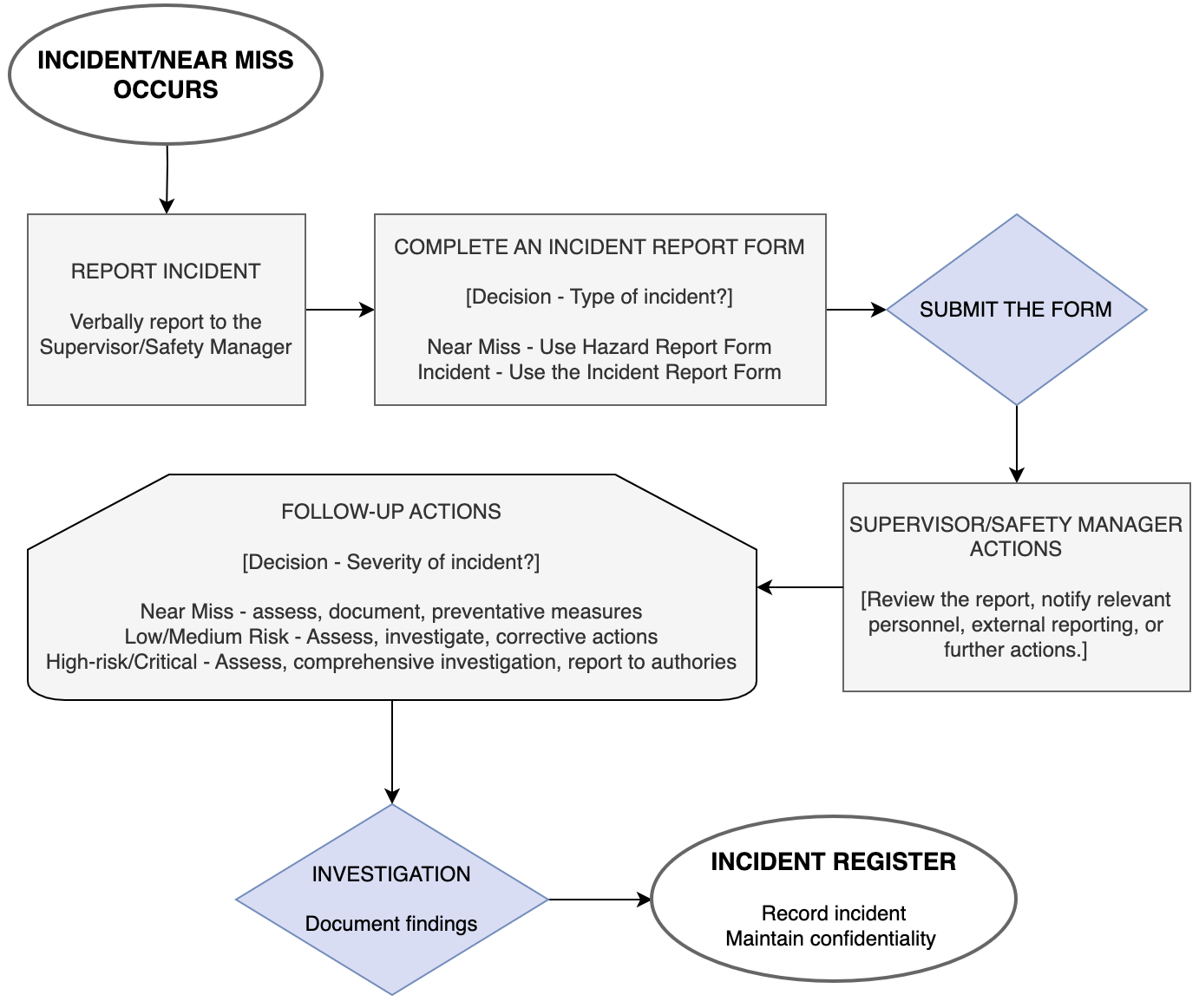
Flow chart: an incident or near miss occurs; report it verbally to the supervisor or safety manager; complete an incident report form (Hazard Report Form for a near miss, Incident Report Form for an incident); submit the form; the supervisor or safety manager reviews it, notifies personnel, reports externally or takes further action; follow-up actions by severity; investigation and findings; the incident is recorded in the incident register.
Figure 1: Incident reporting flow chart

Reporting steps

섹션 2개 더

  1. Incident register
  2. Notifiable incident reporting procedure

전체 내용이 작성되어 있어 사업장 정보만 넣으면 됩니다.

미리 보기 방식

브라우저에서 보이는 모습

이 시스템 받기

무료로 가입한 뒤 받는 방법을 선택하세요. 모든 문서가 팩 이름으로 된 폴더에 담겨 라이브러리에 들어갑니다.

  • 유료 요금제에 포함

    요금제의 템플릿 크레딧을 사용하세요. 이 템플릿은 10입니다.

    요금제와 가격 비교
  • 한 번 구매하기

    $499.95 한 번 결제로 계속 소유합니다. 무료 요금제에서도 사용할 수 있습니다.

가입에 카드가 필요 없습니다. 얼리 액세스 회원은 모든 요금제에서 30% 할인을 받습니다.

다루는 내용

섹션 3개

  1. Reporting steps
  2. Incident register
  3. Notifiable incident reporting procedure

템플릿 이용 방법

먼저 써 보고 결제하세요.

  1. 무료 미리 보기

    모든 템플릿의 작업 단계, 위험 요소, 첫 번째 작업 내용을 자유롭게 볼 수 있습니다. 가입이 필요 없습니다.

  2. 에디터 써 보기

    컴퓨터나 휴대폰에서 데모 SWMS에 회사, 작업, 현장 정보를 넣어 보세요.

  3. 무료 가입

    입력한 정보와 로고가 그대로 옮겨집니다. 이 템플릿이 정보가 채워진 상태로 열립니다.

  4. 크레딧 사용 또는 한 번 구매

    유료 요금제에는 매달 템플릿 크레딧이 포함됩니다. 또는 이 템플릿만 구매해 계속 소유하세요.